Account Contact
Your Cart
Pay the courier with no extra fees.
Need help? DistriNode AI can handle any task on our site.

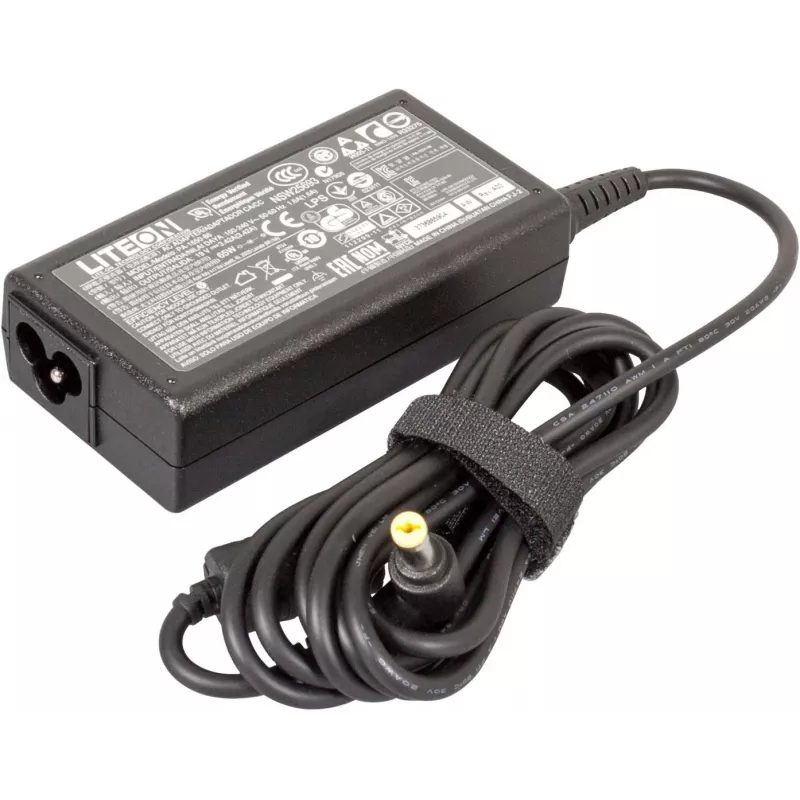
Acer AC Adapter 65W 19V 3-pin model AP.065B1.026 power supply

Acer AC Adapter 65W 19V 3-pin model AP.065B1.026 power supply
R806
Acer AC Adapter 65W 19V 3-pin model AP.065B1.026 power supply is an external AC adapter designed to deliver stable 19V DC power with a maximum output of 65 watts via a three-pin connector. It is intended as a replacement or spare power supply for compatible Acer laptops and portable devices, providi... Read More
Stock 6 Code 1525816 Brand ACER Model AP.065B1.026 Warranty 2 Years

Shipping & Returns

Estimated delivery Tuesday, October 6
You will be kept updated through our detailed tracking system
Payment options
EFTPayFastBank CardSnapScanZapperGoogle PayApple PayMobicredMoreTymePay on Arrival

Acer AC Adapter 65W 19V 3-pin model AP.065B1.026 power supply is an external AC adapter designed to deliver stable 19V DC power with a maximum output of 65 watts via a three-pin connector. It is intended as a replacement or spare power supply for compatible Acer laptops and portable devices, providing reliable charging and operation while remaining compact enough for everyday portability. The adapter includes the main power brick and integrated cable with the 3-pin plug to connect to supported devices.

Advantages

The adapter provides a consistent 19V output and 65W power delivery suitable for a range of notebook models, ensuring steady performance during charging and operation. Its compact design reduces bulk in bags and makes it convenient for travel or mobile work. Built-in safety features in the adapter and cable protect connected devices from common electrical issues while maintaining compatibility with devices designed to accept a 3-pin connector.

Suitable for

  • Replacing a lost or damaged original Acer power adapter
  • Keeping as a spare adapter for work, home, or travel
  • Powering compatible Acer laptops and portable devices that require 19V and up to 65W
  • Using in multi-location setups where a dedicated adapter is needed

Key specifications

  • Output voltage: 19V DC
  • Maximum power: 65W
  • Connector type: 3-pin DC connector
  • Input: AC mains compatible with standard household voltages (adapter accepts required input range)
  • Housing: compact external power brick with integrated cable

How to use

Connect the adapter to an AC mains outlet using the supplied cable and plug the 3-pin connector into the device’s power inlet. Ensure the device is switched off or in a safe state before first connection if recommended by the device manufacturer. After connection, check the device charging or power indicator to confirm proper operation. Disconnect from mains before removing the connector from the device when charging is complete or before transporting the adapter.

Recommendations

The adapter should be used with devices that specify 19V and do not draw more than 65W. Avoid exposing the adapter to moisture, extreme heat, or heavy physical impact. Use the adapter on a stable surface with adequate ventilation and avoid covering the power brick during operation to prevent heat build-up.
Key Highlights
  • Replacing a lost or damaged original Acer power adapter
  • Keeping as a spare adapter for work, home, or travel
  • Powering compatible Acer laptops and portable devices that require 19V and up to 65W
  • Using in multi-location setups where a dedicated adapter is needed
  • Output voltage: 19V DC
  • Maximum power: 65W
  • Connector type: 3-pin DC connector
  • Input: AC mains compatible with standard household voltages (adapter accepts required input range)
  • Housing: compact external power brick with integrated cable
Price history over the last 6 months
Acer AC Adapter 65W 19V 3-pin model AP.065B1.026 power supply
Current
R806
Lowest
R772
Highest
R815
Change 24H
+R6   +1%
Week
+R18   +2%
Month
+R18   +2%

Popular products in this category

WhatsApp
Hi, I’m DistriNode’s AI assistant. I can help you find products, compare options, create quote PDFs, or open support requests.