Account Contact
Your Cart
Pay the courier with no extra fees.
Need help? DistriNode AI can handle any task on our site.

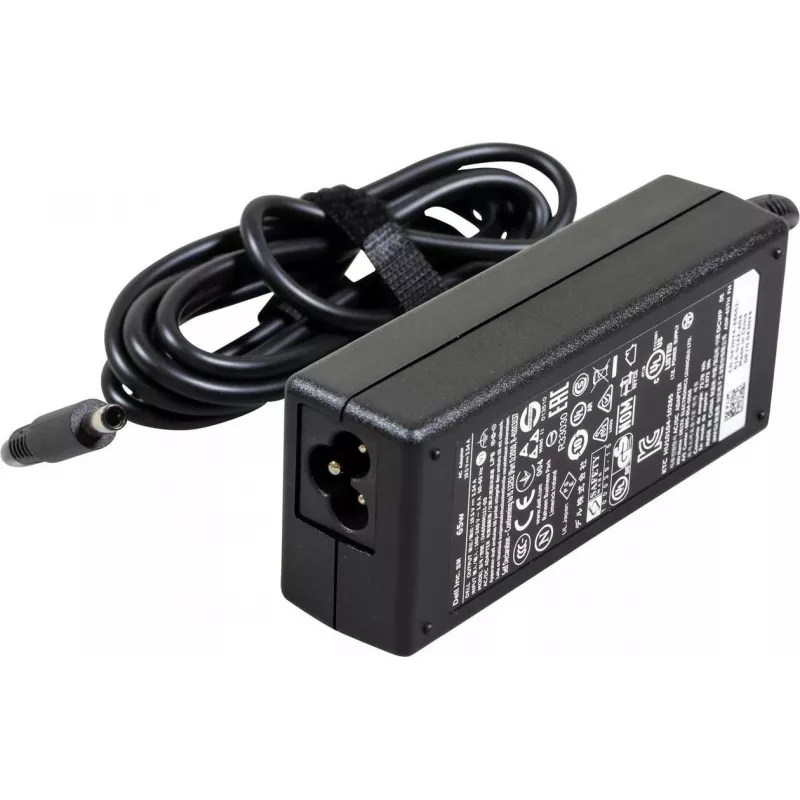
AC Adapter Dell 65W 19.5V 3.34A for XPS laptops (model 4X6M0)

AC Adapter Dell 65W 19.5V 3.34A for XPS laptops (model 4X6M0)
R778
Replacement AC adapter compatible with Dell XPS laptops, rated 65W with an output of 19.5V and 3.34A. This compact adapter supplies stable power for charging the laptop battery and operating the device under normal workloads. The adapter is intended for use where the original Dell 65W power supply i... Read More
Stock 109 Code 1744283 Brand DELL Model 4X6M0 Warranty 2 Years

Shipping & Returns

Estimated delivery Tuesday, October 6
You will be kept updated through our detailed tracking system
Payment options
EFTPayFastBank CardSnapScanZapperGoogle PayApple PayMobicredMoreTymePay on Arrival

Replacement AC adapter compatible with Dell XPS laptops, rated 65W with an output of 19.5V and 3.34A. This compact adapter supplies stable power for charging the laptop battery and operating the device under normal workloads. The adapter is intended for use where the original Dell 65W power supply is required or as a spare for travel and stationary setups.

Advantages

The adapter delivers a consistent 19.5V/3.34A output to maintain charging performance and system operation. Its compact, rectangular housing and integrated cable reduce bulk for transport and storage. Built-in protection features help guard against common electrical issues such as overcurrent, overvoltage and short circuits, supporting safe daily use with compatible Dell XPS systems.

Suitable for

  • Charging Dell XPS laptops that accept a 19.5V, 3.34A, 65W adapter
  • Replacing a lost or damaged 65W power adapter
  • Portable use during travel or mobile work
  • Office and home use where a compact spare power supply is needed

Key specifications

  • Output voltage: 19.5 V
  • Output current: 3.34 A
  • Output power: 65 W
  • Connector type: barrel-style DC connector compatible with Dell XPS input
  • Input: AC mains (typical range for laptop adapters)
  • Form factor: compact external brick with fixed cable
  • Protection: overcurrent, overvoltage and short-circuit protection

How to use

Connect the AC adapter to a suitable mains outlet using the supplied or appropriate detachable power cord. Plug the DC connector into the laptop DC input jack until it seats securely. When connected, the laptop battery will charge and the system can operate from mains power. Disconnect the adapter by pulling the connector straight out; avoid excessive bending of the cable at the connector. Unplug the mains cord from the outlet when the adapter is not in use for extended periods.

Recommendations

Use the adapter with compatible Dell XPS models that require a 19.5V/3.34A, 65W supply. Keep ventilation around the adapter brick clear during operation and avoid exposure to moisture, extreme temperatures or physical impact. For reliable charging, use intact cables and connectors and replace the adapter if you notice unusual heat, noise or inconsistent charging behavior.

Key Highlights
  • Charging Dell XPS laptops that accept a 19.5V, 3.34A, 65W adapter
  • Replacing a lost or damaged 65W power adapter
  • Portable use during travel or mobile work
  • Office and home use where a compact spare power supply is needed
  • Output voltage: 19.5 V
  • Output current: 3.34 A
  • Output power: 65 W
  • Connector type: barrel-style DC connector compatible with Dell XPS input
  • Input: AC mains (typical range for laptop adapters)
  • Form factor: compact external brick with fixed cable
  • Protection: overcurrent, overvoltage and short-circuit protection
Price history over the last 6 months
AC Adapter Dell 65W 19.5V 3.34A for XPS laptops (model 4X6M0)
Current
R778
Lowest
R761
Highest
R817
Change 24H
+R10   +1%
Week
+R16   +2%
Month
+R1   +0%

Popular products in this category

WhatsApp
Hi, I’m DistriNode’s AI assistant. I can help you find products, compare options, create quote PDFs, or open support requests.