Account Contact
Your Cart
Pay the courier with no extra fees.
Need help? DistriNode AI can handle any task on our site.

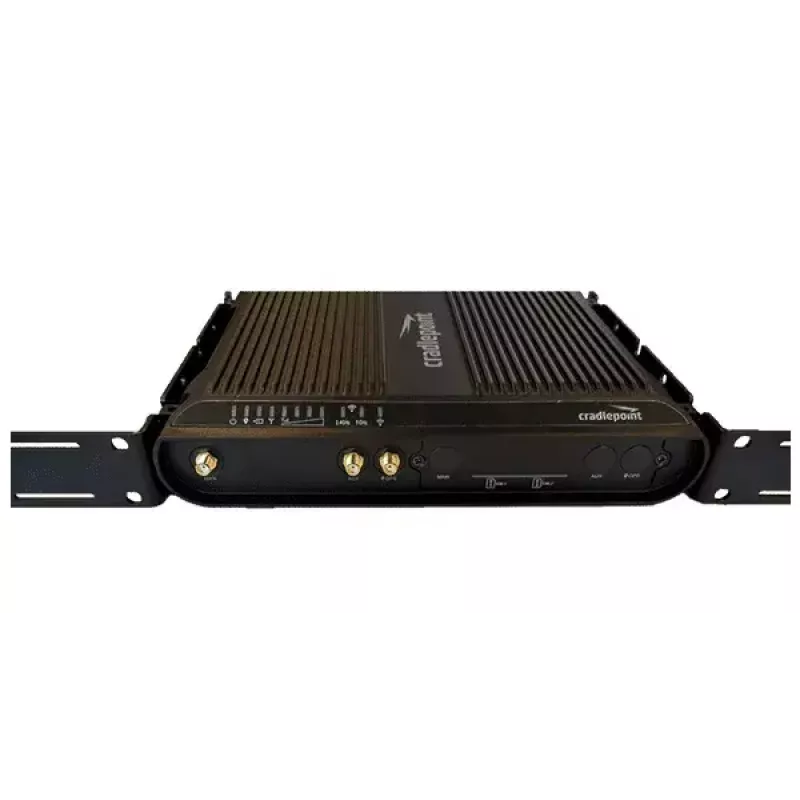
Mounting kit CradlePoint 170750-001, black, accessory for CradlePoint devices

Mounting kit CradlePoint 170750-001, black, accessory for CradlePoint devices
R1,107
CradlePoint 170750-001 is a black mounting kit designed as an accessory for compatible CradlePoint networking devices. The kit contains the hardware components necessary to secure a router or gateway to a wall or other flat surface, providing a stable fixed installation for offices, retail environme... Read More
Stock 80 Code 2577095 Brand CRADLEPOINT Model 170750-001 Warranty 2 Years

Shipping & Returns

Estimated delivery Friday, October 9
You will be kept updated through our detailed tracking system
Payment options
EFTPayFastBank CardSnapScanZapperGoogle PayApple PayMobicredMoreTymePay on Arrival

CradlePoint 170750-001 is a black mounting kit designed as an accessory for compatible CradlePoint networking devices. The kit contains the hardware components necessary to secure a router or gateway to a wall or other flat surface, providing a stable fixed installation for offices, retail environments, or field deployments where a permanent mounting solution is required.

Advantages

The mounting kit offers a compact, low-profile mounting option that preserves device airflow and access to ports while keeping the unit securely in place. Its color-matched finish integrates with common CradlePoint device housings for a discreet appearance. Durable metal and plastic components are used to withstand routine handling and maintain alignment over time.

Suitable for

  • Wall mounting of CradlePoint routers and gateways
  • Permanent installations in offices and retail locations
  • Field deployments requiring fixed, vibration-resistant mounting
  • Network closets or equipment rooms where space-saving mounting is needed

Key specifications

  • Color: black
  • Material: metal and durable plastic components
  • Purpose: secure wall or surface mounting for compatible networking devices
  • Included items: mounting brackets, fasteners and hardware required for installation
  • Finish: matte or low-gloss surface to blend with device housings

How to use

Position the mounting brackets on the desired surface, mark the mounting points, and drill pilot holes where appropriate. Attach the bracket to the wall or surface using the supplied fasteners, then align the CradlePoint device with the bracket and secure it using the included hardware. Verify that all fasteners are tightened and that the device is level and stable before connecting power and network cabling.

Recommendations

Install the kit on a load-bearing surface rated for the combined weight of the device and mount. Use appropriate wall anchors for drywall or hollow surfaces and follow local electrical and building codes when routing power or network cables. Periodically check fastener tightness in high-vibration environments.

Key Highlights
  • Wall mounting of CradlePoint routers and gateways
  • Permanent installations in offices and retail locations
  • Field deployments requiring fixed, vibration-resistant mounting
  • Network closets or equipment rooms where space-saving mounting is needed
  • Color: black
  • Material: metal and durable plastic components
  • Purpose: secure wall or surface mounting for compatible networking devices
  • Included items: mounting brackets, fasteners and hardware required for installation
  • Finish: matte or low-gloss surface to blend with device housings
Specifications
Compatibility
Cradlepoint IBR1700 Series
Product colour
Black
Screws included
Yes
Price history over the last 6 months
Mounting kit CradlePoint 170750-001, black, accessory for CradlePoint devices
Current
R1,107
Lowest
R1,090
Highest
R1,319
Change 24H
+R13   +1%
Week
-R1   0%
Month
+R9   +1%

Popular products in this category

WhatsApp
Hi, I’m DistriNode’s AI assistant. I can help you find products, compare options, create quote PDFs, or open support requests.